

Why SEO Reporting Matters in 2026
SEO involves many moving parts, including keyword rankings, organic traffic, content performance, technical improvements, backlinks, conversions, and user behavior. Without a clear reporting system, businesses can struggle to understand which activities are actually contributing to growth.
This is where SEO reporting dashboards become valuable.
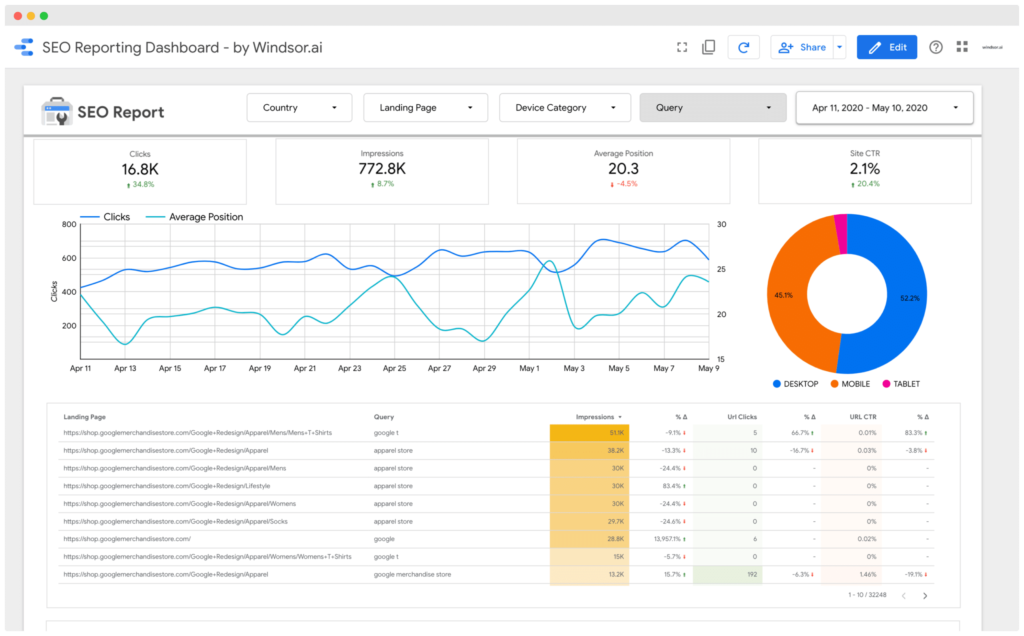
An SEO reporting dashboard brings important search performance data into an organized visual format. Instead of reviewing multiple platforms and spreadsheets separately, businesses can use a dashboard to identify trends, understand performance changes, and decide what actions should come next.
In 2026, SEO reporting is also becoming more sophisticated as businesses evaluate traditional Google Search performance alongside AI-driven search visibility, content performance, and conversion data.
The goal should not be to create a dashboard filled with hundreds of numbers. A useful dashboard should make important information easier to understand and turn data into actionable marketing decisions.
What Is an SEO Reporting Dashboard?
An SEO reporting dashboard is a visual system that organizes important search engine optimization metrics in one place.
Depending on the business and reporting setup, a dashboard may include data from:
- Google Search Console.
- Google Analytics.
- Rank-tracking platforms.
- SEO tools.
- Website analytics.
- Conversion tracking.
- Content performance systems.
Google Search Console’s Performance report includes clicks, impressions, click-through rate, and average position, while data can be analyzed by queries, pages, countries, devices, and search appearance.
A dashboard can bring these measurements together with business-focused metrics such as leads and conversions.
How SEO Dashboards Help Businesses Make Better Decisions
1. Turn Complex SEO Data Into Clear Insights
SEO platforms can produce a large amount of information. Looking at individual metrics without context can make it difficult to understand what is actually happening.
A dashboard can simplify the information by showing important trends over a selected period.
For example, a business may see:
- Organic clicks increasing.
- Impressions increasing faster than clicks.
- CTR declining.
- Certain service pages gaining visibility.
- Blog traffic increasing but producing few enquiries.
These patterns can lead to specific actions rather than simply reporting that “SEO improved.”
Google recommends focusing on trends in clicks and impressions rather than relying on average position alone because position can be a complex metric.
2. Identify Which Pages Are Performing
Not every page contributes equally to organic growth.
A reporting dashboard can help businesses identify their strongest and weakest pages by reviewing traffic, impressions, CTR, conversions, and other relevant measurements.
For example, a service page may have relatively low traffic but generate several qualified enquiries. Meanwhile, a blog post may attract thousands of visitors without generating any meaningful business action.
This distinction is important because high traffic does not automatically mean high business value.
Businesses should therefore evaluate page performance in relation to their goals.
Measuring SEO Beyond Rankings
3. Connect SEO With Leads and Conversions
One of the biggest limitations of traditional SEO reporting is focusing too heavily on rankings.
Ranking improvements can be useful, but businesses ultimately need to know whether organic visibility is contributing to meaningful outcomes.
A stronger dashboard can connect SEO activity with:
- Organic sessions.
- Contact-form submissions.
- Phone enquiries.
- Consultation requests.
- Ecommerce transactions.
- Qualified leads.
- Revenue where tracking is available.
This allows businesses to ask more useful questions:
Which pages generate leads?
Which search queries attract potential customers?
Which content contributes to conversions?
Which SEO improvements deserve more investment?
A reporting dashboard should therefore connect SEO metrics with actual business objectives rather than treating rankings as the final goal.
4. Find Content Opportunities
SEO reporting dashboards can also help businesses discover opportunities for new or improved content.
For example, Search Console can show the queries that are bringing impressions and clicks to a website. Businesses can review these queries to identify subjects where their content already has visibility but could potentially be improved.
A dashboard might reveal:
- High-impression queries with low CTR.
- Pages ranking for unexpected keywords.
- Topics generating increasing impressions.
- Pages losing organic visibility.
- Search queries without dedicated content.
These insights can guide future content planning.
Instead of publishing articles based only on assumptions, businesses can use actual search performance data to identify areas worth investigating.
5. Understand Local SEO Performance
Local businesses often need reporting that goes beyond overall website traffic.
For example, a company targeting customers in Doha may want to understand how its location-specific service pages and local search visibility are performing.
A dashboard can organize relevant SEO information and help businesses evaluate whether their local strategy is generating meaningful website visits and enquiries.
Businesses investing in affordable seo services USA can use reporting dashboards to monitor performance across target markets and identify areas where visibility or conversion opportunities need attention.
The exact metrics should depend on the business’s goals, service areas, and available tracking data.
The Role of AI in SEO Reporting
6. Use AI to Find Patterns Faster
AI is increasingly being used to assist with SEO analysis and reporting. Rather than manually reviewing every metric, AI tools can help identify unusual changes, summarize trends, group related queries, and highlight areas that deserve further investigation.
For example, an AI-assisted reporting system might identify that organic impressions increased significantly for a particular topic while clicks remained relatively flat.
That insight could lead marketers to investigate:
- Search-result appearance.
- Page titles.
- Meta descriptions.
- Search intent.
- Competitor results.
- Content relevance.
AI can help accelerate analysis, but it should not automatically decide what caused a performance change. Data needs to be interpreted in context, and important conclusions should be reviewed by an SEO professional.
7. Make Monthly SEO Meetings More Productive
SEO reports are often reviewed during monthly marketing meetings. A dashboard can make these discussions more focused.
Instead of spending the meeting reading numbers, teams can discuss:
- What changed?
- Why might it have changed?
- Which pages need attention?
- Which content should be updated?
- Which technical issues should be prioritized?
- What should happen next month?
This turns SEO reporting from a simple documentation exercise into an ongoing decision-making process.
A useful reporting approach connects metrics with explanations and recommended next actions rather than simply presenting charts.
Essential Metrics for an SEO Reporting Dashboard
A dashboard should contain metrics that match the business’s objectives.
Search Visibility
Useful measurements can include:
- Impressions.
- Clicks.
- CTR.
- Average position.
- Ranking keywords.
Search Console provides these core search-performance measurements directly.
Website Performance
Depending on the analytics setup, businesses can monitor:
- Organic sessions.
- Landing-page performance.
- Engagement.
- Returning users.
- Device performance.
Conversion Performance
For businesses focused on leads or sales:
- Leads from organic traffic.
- Conversion rate.
- Consultation requests.
- Form submissions.
- E-commerce transactions.
- Revenue attributed to organic search where measurement supports it.
Content Performance
Businesses can also track:
- Top-performing articles.
- Pages gaining traffic.
- Pages losing traffic.
- Content updates.
- Search queries associated with each page.
How to Build an Effective SEO Dashboard
Step 1: Define Business Goals
Start by deciding what SEO is expected to achieve.
The goal might be more qualified leads, e-commerce sales, local enquiries, or increased visibility for specific services.
Step 2: Select Relevant Metrics
Avoid adding every available metric. Choose measurements that help answer important business questions.
Step 3: Connect Reliable Data Sources
Use appropriate platforms such as Search Console, analytics systems, and SEO tools. Make sure metric definitions remain consistent between reporting periods.
Step 4: Compare Meaningful Time Periods
Compare performance with previous periods where appropriate. Longer-term trends can be more useful than reacting to isolated daily fluctuations.
Step 5: Add Actions and Commentary
A dashboard becomes more valuable when it explains what changed and what should be investigated or improved next.
Choosing an SEO Reporting Partner
Businesses working with an SEO provider should understand how performance will be measured and communicated.
For example, a company evaluating the best seo company Doha should ask whether reporting includes only rankings or also traffic, content performance, conversions, and recommendations.
A useful SEO report should make it easier for the business to understand the work being performed, the measurable changes observed, and the areas requiring further attention.
For businesses targeting Doha, seo services Doha reporting can also be structured around local visibility, relevant service pages, qualified enquiries, and market-specific search performance.
Common SEO Reporting Mistakes
Businesses should avoid dashboards that:
- Contain too many irrelevant metrics.
- Focus exclusively on rankings.
- Ignore conversions.
- Show data without explanations.
- Compare incompatible time periods.
- Hide negative performance changes.
- Treat correlation as proof of causation.
- Use AI-generated conclusions without human review.
A dashboard should provide clarity rather than create more confusion.
Conclusion: Turn SEO Data Into Better Marketing Decisions
SEO reporting dashboards give businesses a clearer way to understand organic search performance and connect SEO activity with broader marketing objectives.
The most useful dashboards do more than display rankings or traffic. They help businesses identify opportunities, detect performance changes, understand content results, measure leads, and determine what actions deserve attention next.
In 2026, AI can make reporting and analysis faster by helping marketers identify patterns and summarize large datasets. However, human interpretation remains important when deciding why performance changed and what should happen next.
Ultimately, the purpose of an SEO dashboard is simple: turn data into better decisions. When businesses track the right metrics and connect search visibility with meaningful business outcomes, SEO reporting becomes a practical tool for improving marketing performance over time.